Black Box Case guide: align clocks and test a causal explanation
Keep original equipment records, aligned plant time, your causal claim and the intervention result separate across the two cases.
Two causal-deduction cases: collect evidence, test a fix, then account for safety and production.
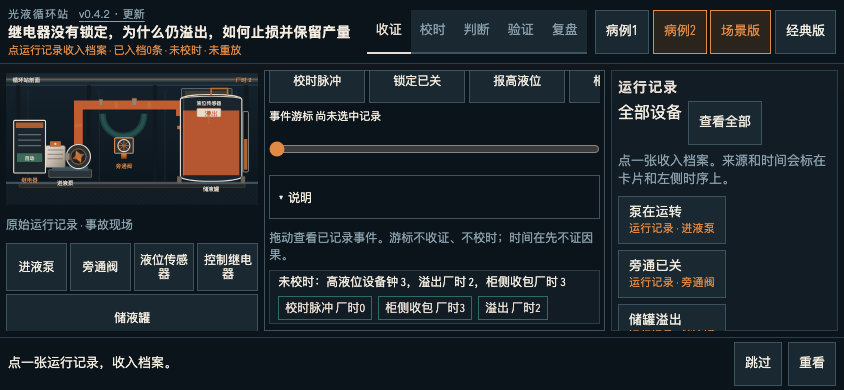
Select equipment to inspect its original records. Open or fold the evidence drawer; inspect plant time and device clocks on separate tracks. Moving the event cursor does not align clocks or start a replay. Align the clocks and compare causes. Case 2 adds a delayed signal: the old auto-stop fix fails, while restoring the live signal can preserve production. Evidence and archives stay separate for each case. On landscape phones, the equipment field, both clock tracks and current actions have separate areas, with horizontal scrolling cues. Expanded timeline help shows the full clock relationships and explanation; closing it keeps the compact layout. Original case and run rules are unchanged. Landscape or desktop is a better fit.
Two causal-deduction cases with separate evidence and archives. Landscape or desktop is a better fit for comparing the clock tracks.
Select equipment to inspect original records. Open the evidence drawer, inspect the timeline, align clocks and use the case’s intervention and replay controls.
A timestamp from one device cannot be compared directly with another device until their clock relationship is established.
A plausible story is not a tested cause. Keep original evidence, your proposed explanation and the intervention result separate.
Keep original equipment records, aligned plant time, your causal claim and the intervention result separate across the two cases.
Browse the other browser games or choose a player guide. If the game does not load, include its address, your device and the visible error when contacting player support. Game-specific saved progress may depend on browser site data; check before clearing it.