Black Box Case guide: align clocks and test a causal explanation
Keep original equipment records, aligned plant time, your causal claim and the intervention result separate across the two cases.
Black Box Case rules and controls · Play Black Box Case
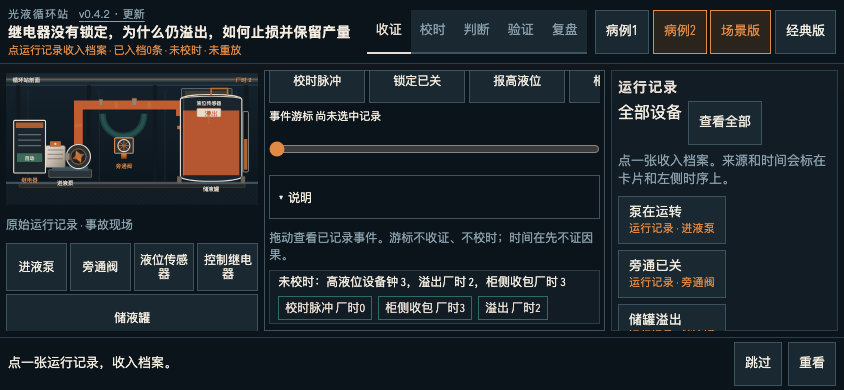
Collect the record before explaining it
Black Box Case contains two causal-deduction cases. Begin by selecting equipment and collecting its original running records. Note which device produced a record and which clock its timestamp uses. Two events with similar displayed times are not necessarily simultaneous.
Open the evidence drawer to review what has actually been collected. Treat an equipment symptom as evidence to explain, rather than as proof of your first story about the incident. The case archive and the result of an intervention serve different purposes.
Align device clocks with plant time
The interface separates plant time from device-clock tracks. Align those clocks before deciding which event came first. Moving the event cursor only changes what you are inspecting; it does not establish the clock relationship and does not start a replay.
Use the expanded timeline help when the compact tracks are hard to interpret. After alignment, revisit the order of the records. If your original explanation depended on comparing raw timestamps from different devices, that explanation may need to change.
Connect a claim to the relevant evidence
Choose a causal judgment and associate it with the running records that support it. Ask which observation would be surprising if the proposed cause were wrong. A collection of records and a confident narrative are not enough unless the records bear on the particular claim.
Keep three things separate: the original observation, your explanation of it and the result you expect from a proposed intervention. This makes a failed replay useful, because you can identify which prediction did not hold.
Choose an intervention and compare the replay
Inspect which condition the intervention will change, choose the prediction, then run the replay. Compare the planned action, predicted result and actual result. Consider production as well as safety: stopping a process can change both, and one favourable indicator does not settle the whole case.
If the evidence does not support the conclusion, return to the records instead of treating the intervention button as a verdict. The game distinguishes a contained loss from a case that has enough support to close.
Do not copy the first fix into the second case
The second case introduces a delayed signal. Repeating the old automatic-stop fix fails there, while restoring the live signal can preserve production. That difference is a reason to inspect the second case's records and clock relationship afresh.
Evidence and archives remain separate for each case. Landscape or desktop gives more room for the equipment field and both clock tracks; on a phone, follow the horizontal scrolling cues and use timeline help. Complete the actual intervention and review its outcome before treating a plausible explanation as a tested cause.
Continue playing
Two causal-deduction cases with separate evidence and archives. Landscape or desktop is a better fit for comparing the clock tracks.
Try the next attempt in Black Box Case. For a different game, browse the guide library. Report a rule that no longer matches the game through player support.