OpticsBench guide: focus, exposure, motion blur and recorded prints
Separate focus from motion smear, balance aperture and shutter, and use actual frozen prints to evaluate OpticsBench photography tasks.
Four photography tasks with a viewfinder, aperture ring and shutter dial.
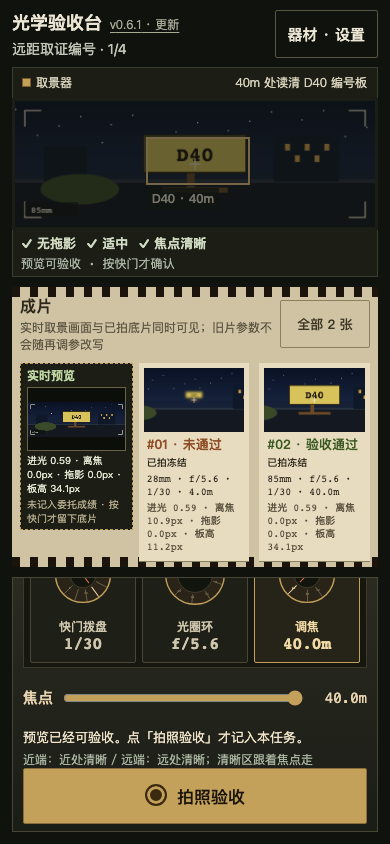
Tap a subject to focus, balance exposure, depth of field and smear, then press the shutter. Keep the actual live viewfinder image beside up to two frozen prints and their recorded settings. Later dial moves leave old frames unchanged; live preview does not count as a task score. The optional D40 task photographs a static identifier board at 40m: its height must reach 30px on the 320-wide master while meeting the original light and blur limits. A longer lens enlarges the real image; the touch box does not count. The original three tasks keep their rules. The No motion blur badge only describes smear; it does not claim an out-of-focus subject is readable. Portrait and landscape controls; Classic remains in Settings.
Four photography tasks, including an optional distant identifier task. The live viewfinder and frozen prints serve different purposes.
Tap the subject to focus, adjust the aperture and shutter controls, and press the shutter to record a print. Compare up to two frozen prints.
The No motion blur badge describes smear only. An out-of-focus subject may still be unreadable.
For D40, the actual board image must reach the stated pixel height; enlarging the touch target does not count.
Separate focus from motion smear, balance aperture and shutter, and use actual frozen prints to evaluate OpticsBench photography tasks.
Browse the other browser games or choose a player guide. If the game does not load, include its address, your device and the visible error when contacting player support. Game-specific saved progress may depend on browser site data; check before clearing it.