OpticsBench guide: focus, exposure, motion blur and recorded prints
Separate focus from motion smear, balance aperture and shutter, and use actual frozen prints to evaluate OpticsBench photography tasks.
OpticsBench rules and controls · Play OpticsBench
Read what the photograph must prove
Each task identifies a subject and acceptance conditions. Before adjusting the camera, decide which subject must be readable, whether it moves, and whether more than one distance needs to be clear. A pleasing live preview is not automatically a passing task photograph.
Tap the intended subject to focus. Then inspect brightness, depth of field and motion smear as separate properties. The scene can be bright enough but out of focus, or focused but smeared by movement.
Change one cause of failure at a time
Shutter and aperture affect different parts of the picture. A faster shutter can reduce motion smear but changes exposure. Aperture changes the light and depth-of-field balance. After turning a dial, look at what actually changed in the viewfinder before compensating with another control.
When a shot fails, read the recorded result. If the issue is focus, changing only the shutter does not establish that focus improved. If the issue is smear, a readable stationary subject does not prove that a moving subject will also be sharp.
Compare the saved photograph, not a new preview
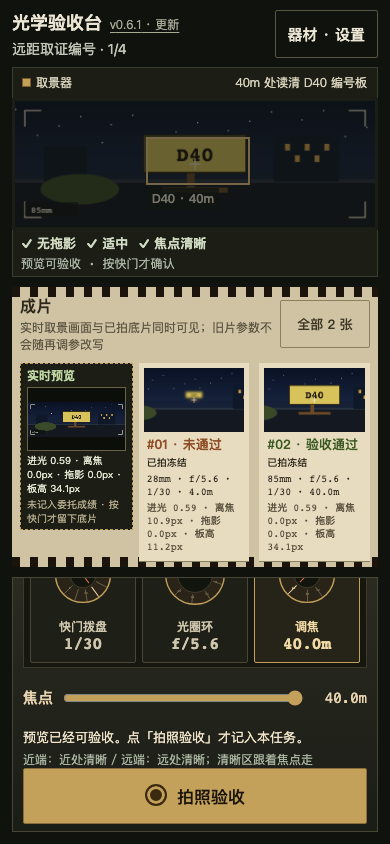
Press the shutter to make a real print. The workbench can keep up to two frozen prints with their recorded settings. Later dial changes affect the live view, not the pixels or settings of an old print.
Use two prints for a controlled comparison: keep the task and subject fixed, change one relevant setting and take another photograph. Compare both the recorded settings and the visible subject. An improvement in preview is a reason to take the next shot, not a substitute for taking it.
Interpret D40 and the blur badge correctly
The optional D40 task uses a static identifier board at 40 metres. The board image must reach 30 pixels in height on the 320-wide master while meeting the original light and blur limits. A longer lens enlarges the actual image; the touch target’s size is not the measurement.
The No motion blur badge describes motion smear only. It does not assert that an out-of-focus identifier is readable. Check the actual print and the remaining acceptance conditions before treating that badge as a complete pass.
Continue playing
Four photography tasks, including an optional distant identifier task. The live viewfinder and frozen prints serve different purposes.
Try the next attempt in OpticsBench. For a different game, browse the guide library. Report a rule that no longer matches the game through player support.