Pinball Works guide: ordered targets, Budget and Dual-band recovery
Build an A-to-B-to-C recovery route, diagnose the first failed condition and distinguish Budget, Gentle and Dual-band requirements.
Four recovery commissions on a live pinball workbench.
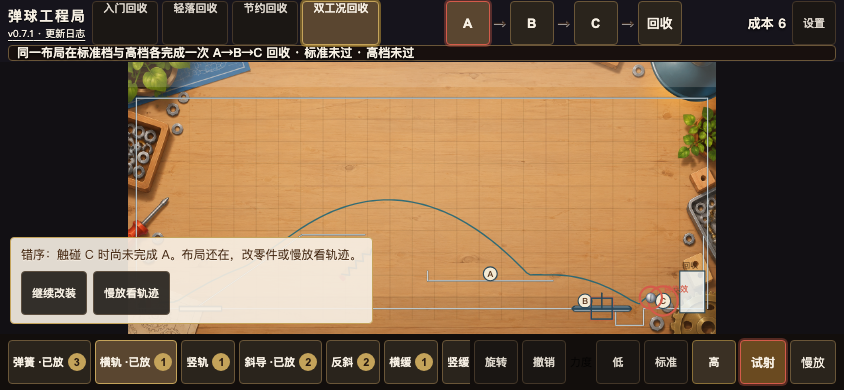
Tap to place or select a part; drag to pan and pinch to zoom around your fingers. The parts drawer stows during a shot or slow replay. Pan and zoom in portrait with the mini overview. On a short landscape screen, parts and controls stay in one row to leave more room for the table. Touch A→B→C, then the recovery bin. Intro keeps its original goal; Gentle limits entry speed to 40. Budget recovery limits this shot's part cost to 1, without a speed cap. Dual-band recovery needs two fresh shots on the same layout: Standard and High must each touch A→B→C and reach the bin. One band alone does not deliver the job; editing the layout clears the pair. Over-budget shots still run, but do not complete Budget delivery; the layout stays for revision. Out-of-order failures now show their actual cause and the existing edit/slow-motion suggestion while keeping the layout.
Four recovery commissions on a physics workbench. Intro, Gentle, Budget and Dual-band have different delivery conditions.
Tap to place or select a part. Drag to pan, pinch to zoom, and use the selected-part controls to rotate or undo. Start a shot with Test.
Touching every target in the wrong order is not a successful route.
Editing a Dual-band layout clears the recorded pair. Complete both fresh shots after the final layout edit.
Build an A-to-B-to-C recovery route, diagnose the first failed condition and distinguish Budget, Gentle and Dual-band requirements.
Browse the other browser games or choose a player guide. If the game does not load, include its address, your device and the visible error when contacting player support. Game-specific saved progress may depend on browser site data; check before clearing it.