Seed Ark guide: balance food, retained seeds and generation recaps
Plan a Seed Ark generation, distinguish forecast from settled harvest, and use the ledger before spending food or retaining seeds.
Seed Ark rules and controls · Play Seed Ark
Plan from the current generation
Begin with the current forecast, food store and seed bags. Tap a bag to inspect its estimated outcome, then choose an empty plot. The forecast and risk display help you form a plan; they are not already-harvested food.
Compare several plots before submitting. If all your decisions depend on one favourable outcome, inspect what happens to the food ledger when that outcome does not arrive. This is a planning exercise, not a promise that one seed variety always wins.
Submit before interpreting the harvest
Submitting the planting plan reveals the generation’s actual weather and per-plot harvest. Only then can you compare the estimate with the settled result. A lower-than-expected harvest should be diagnosed from that revealed weather and plot result, rather than from an unchanged forecast screen.
In the harvest phase, select which successful plots provide retained seeds. The guide starts with zero new bags selected; check the selection deliberately rather than assuming that every successful plot is automatically retained.
Read the generation ledger
Advancing a generation consumes 8 food according to the in-game guide. Review that cost and seed-storage usage before moving on. Keeping no new seed bags requires attention to the confirmation and to what remains available for the next generation.
The final, sixth generation does not require new seeds for another generation. Apply the current phase’s objective rather than repeating a seed-retention habit after the run no longer needs it.
Learn from a read-only recap
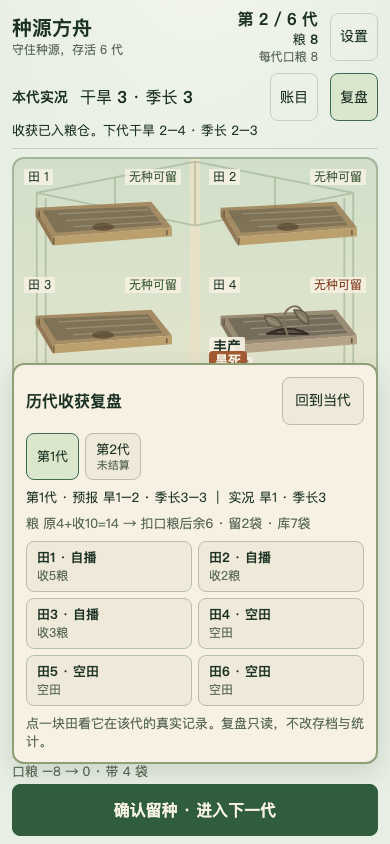
Recorded generation recaps separate forecast and actual weather, food and retained seeds. Use them to locate which assumption failed in an earlier plan. Fields that were not recorded remain marked as such; absence of a record is not evidence of a zero value.
A historical recap does not let you rewrite that generation. Return to the current generation to continue the same local run. When testing a new strategy in a later run, compare it with the documented result rather than treating the old preview as a completed harvest.
Continue playing
A six-generation seed-survival prototype with a local run and read-only harvest recaps.
Try the next attempt in Seed Ark. For a different game, browse the guide library. Report a rule that no longer matches the game through player support.